
One Bot. Every Channel.
Website · WhatsApp · Teams · Skype
Deploy an intelligent AI chatbot on your website with a single plugin script. Connect WhatsApp, Teams, and Skype in minutes. Hand off seamlessly to human agents via the Aprilo Agent App on Android, iOS, and Windows.
Aprilo AI
● Online — Ready to help
One Bot. Multiple Integrations.
The same AI brain, knowledge base, and conversation history — across every platform your customers use.
Website Chat
Embed the AI chatbot on any website with a single script tag. Works with React, WordPress, Shopify, Wix, and any HTML site.
Official Meta WhatsApp Cloud API integration. Customers chat via their personal WhatsApp — no app switch needed.
Microsoft Teams
Deploy the bot directly inside your organization's Teams workspace for internal support and HR queries.
Skype
Engage with legacy Skype users seamlessly. Same bot brain, unified conversation history across all channels.
Live in 4 Steps. No Coding.
From zero to a fully operational, omnichannel AI chatbot in under an hour.
Embed the Plugin Script
Copy one JavaScript snippet from your Aprilo dashboard and paste it into your website's HTML. Takes under 60 seconds. Zero coding knowledge required.
Train Your AI
Upload your organization's documents, FAQs, product manuals, and policies. Set metadata — business name, persona, tone, operating hours, and escalation rules.
Bot Goes Live
The AI immediately starts responding to visitor queries 24/7 with grounded, knowledge-based answers. Watch real conversations in your monitoring dashboard.
Connect All Channels
Integrate WhatsApp, Microsoft Teams, and Skype from your dashboard in minutes. Enable live human handoff by downloading the Aprilo Agent App.
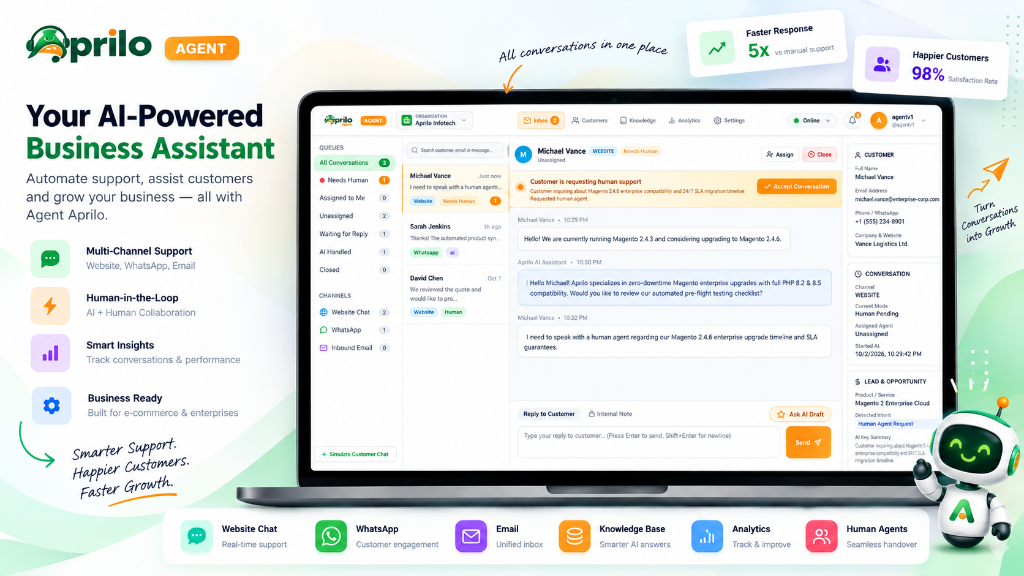
Aprilo Agent — Desktop Workspace & Mobile App
The Aprilo Agent App powers human-in-the-loop support across Windows Desktop, Web, Android, and iOS. View live conversations, step in seamlessly, reply with AI assistance, and manage bot knowledge in real-time.
Aprilo Agent Omnichannel Workspace & Native Mobile App
Real-time live synchronization between desktop command center and mobile field agents
APRILO AGENT
Mobile Live Inbox
12
Active
1
Needs Human
148
Resolved
Michael Vance
Just nowNeed to speak with human agent about Magento 2.4.6 upgrade...
WebsiteSarah Jenkins
1h agoThanks! The automated product sync solved it.
WhatsAppDavid Chen
Oct 1We reviewed the quote and would like to proceed.
Email📱 Mobile Agent App (Android & iOS)
Filter by Needs Human, Assigned to Me, AI Handled, or Waiting for Reply in real-time.
Mobile and desktop sound & push alerts the second a visitor requests human help.
Click "Ask AI Draft" on desktop or mobile to generate ready-to-send responses.
Customer email, phone, company, SLA level, and conversation history loaded instantly.
Android
Full-featured agent app on Google Play
iOS
Native iPhone & iPad app on App Store
Windows Desktop
Desktop app for support team workstations
Real-Time Alerts
Get push notifications the moment a customer needs human assistance.
Unified Inbox
All conversations — WhatsApp, Web, Teams — in a single clean inbox.
Live Chat Monitor
Watch live bot conversations, intervene at any point, or silently observe.
Update Knowledge Base
Edit system prompts, metadata, and FAQs directly from the app.
Assign & Route
Assign conversations to team members and route by department or skill.
Analytics Snapshot
View CSAT, response times, and deflection rates from your pocket.
Complete Visibility. Total Control.
Your monitoring dashboard gives you a real-time view of every conversation, every user, and every insight your AI generates across all channels.
Conversation Dashboard
Live view of all active, queued, and resolved conversations across every channel.
User Tracking
Identify returning visitors, track user journeys, and understand engagement patterns.
Analytics & Insights
Monitor deflection rate, CSAT scores, response times, and peak usage windows.
AI Performance Metrics
Track bot accuracy, escalation triggers, and unresolved query patterns to improve continuously.
Audit Logs
Full audit trail of every bot action, agent intervention, and knowledge base update.
Smart Alerts
Get alerted on high-priority users, negative sentiment spikes, or long wait times.
Agents Control What the Bot Knows
Your support agents can update the bot's context, upload new documents, edit metadata, refine system prompts, and manage the knowledge base — directly from the dashboard or Aprilo Agent App. No developers needed.
- Upload PDFs, FAQs, product docs
- Edit metadata & organization context
- Update system prompts & bot persona
- Manage escalation rules & workflows
product-catalog-2026.pdf
PDF · 2.4 MB
support-faq.docx
DOCX · 480 KB
refund-policy.txt
TXT · 12 KB
How Aprilo Chatbot Powers Your Support System
Aprilo Chatbot is the AI front-line of Aprilo Support. Together, they create a seamless, end-to-end customer support system — from first contact to full resolution.
AI Handles Tier-1 Queries
The chatbot resolves FAQs, order status, returns, and product questions instantly — without any human involvement. Up to 68% of queries never need an agent.
Smart Escalation to Agents
When the AI detects frustration, complexity, or a specific escalation trigger, it packages the full conversation context and routes it to your support team via Aprilo Agent App.
Live Agent Resolves & Trains
Your agent resolves the issue via the Aprilo Agent App and can simultaneously update the knowledge base — so the bot handles similar queries autonomously next time.
Thousands of Teams Love Aprilo Chatbot
“We set up the Aprilo chatbot on our website in under 10 minutes. It now handles 65% of our customer queries without any agent involvement. The WhatsApp integration is flawless.”
Priya Sharma
Head of Customer Success · TechFlow India
“The Aprilo Agent App is brilliant. My team gets instant notifications and can jump into any conversation from their phones. The monitoring dashboard helped us cut response time by 70%.”
Rahul Mehta
Support Manager · RetailNow
“Teams integration was a game-changer for our HR department. Employees ask leave, payroll, and policy questions to the bot 24/7. Our HR team now focuses on complex issues only.”
Ananya Krishnan
HR Director · InfraBuild Corp
Frequently Asked Questions
Everything you need to know about Aprilo AI Chatbot.
QHow do I add the Aprilo Chatbot to my website?
Copy a single JavaScript plugin snippet from your Aprilo dashboard and paste it before the </body> tag of your website. The chatbot goes live instantly with no further coding required.
QDoes Aprilo Chatbot support WhatsApp and Microsoft Teams?
Yes. Aprilo Chatbot natively integrates with WhatsApp via the official Meta Cloud API, Microsoft Teams, and Skype — all from the same bot configuration. One bot, multiple channels.
QHow does live-agent handoff work?
When the AI detects complexity or a user requests a human, the conversation is instantly routed to your support team via the Aprilo Agent App (available on Android, iOS, and Windows Desktop). The agent sees full conversation history and can reply in real-time.
QIs there a free trial for Aprilo Chatbot?
Yes. Aprilo AI Chatbot comes with a 1-month (30-day) 100% free trial. No credit card is required. You get full access to all features including the monitoring dashboard and native agent apps.
QCan agents update the bot's knowledge base in real-time?
Absolutely. Authorized agents can update context, metadata, system prompts, and the knowledge base at any time from the Aprilo dashboard. Changes take effect in real-time without any downtime.
Ready to Transform Your Customer Experience?
Join thousands of happy users. Deploy Aprilo AI Chatbot on your website today, integrate WhatsApp, Teams, and Skype, and empower your team with the Aprilo Agent App. Start free — upgrade when you're ready.
* 1-Month Free Trial includes 40,000 AI queries, full monitoring dashboard access, all channel integrations, and native Aprilo Agent App for Android, iOS, and Windows. AutoPay mandate begins after 30 days unless cancelled.